Terminal or desktop · open source


code review tool.

Code review, annotated.margin opens any git change in your terminal or a desktop window with a coding agent beside you. It plans the route, writes a note beside every change, answers questions on the line, and tells you when you are done.

terminalgo install github.com/redrick/margin/cmd/margin-tui@latest
desktopgo install github.com/redrick/margin/cmd/margin-gui@latest

Go 1.21+ · git · Claude Code, Codex, Gemini CLI, OpenCode or any CLI agent · tmux for the terminal, WebKit for the desktop · MIT

margin — inventory
margin-tuimargin-gui
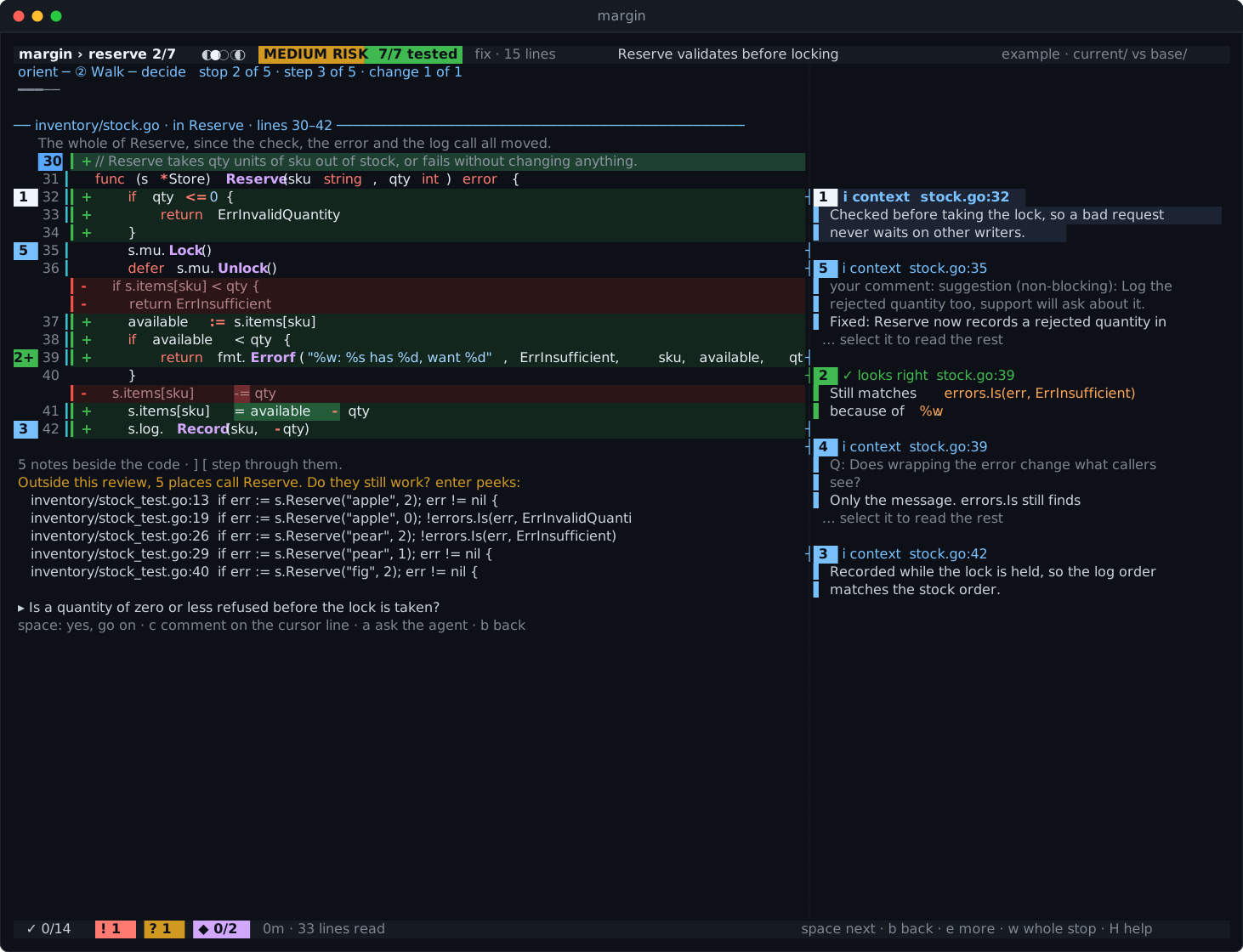
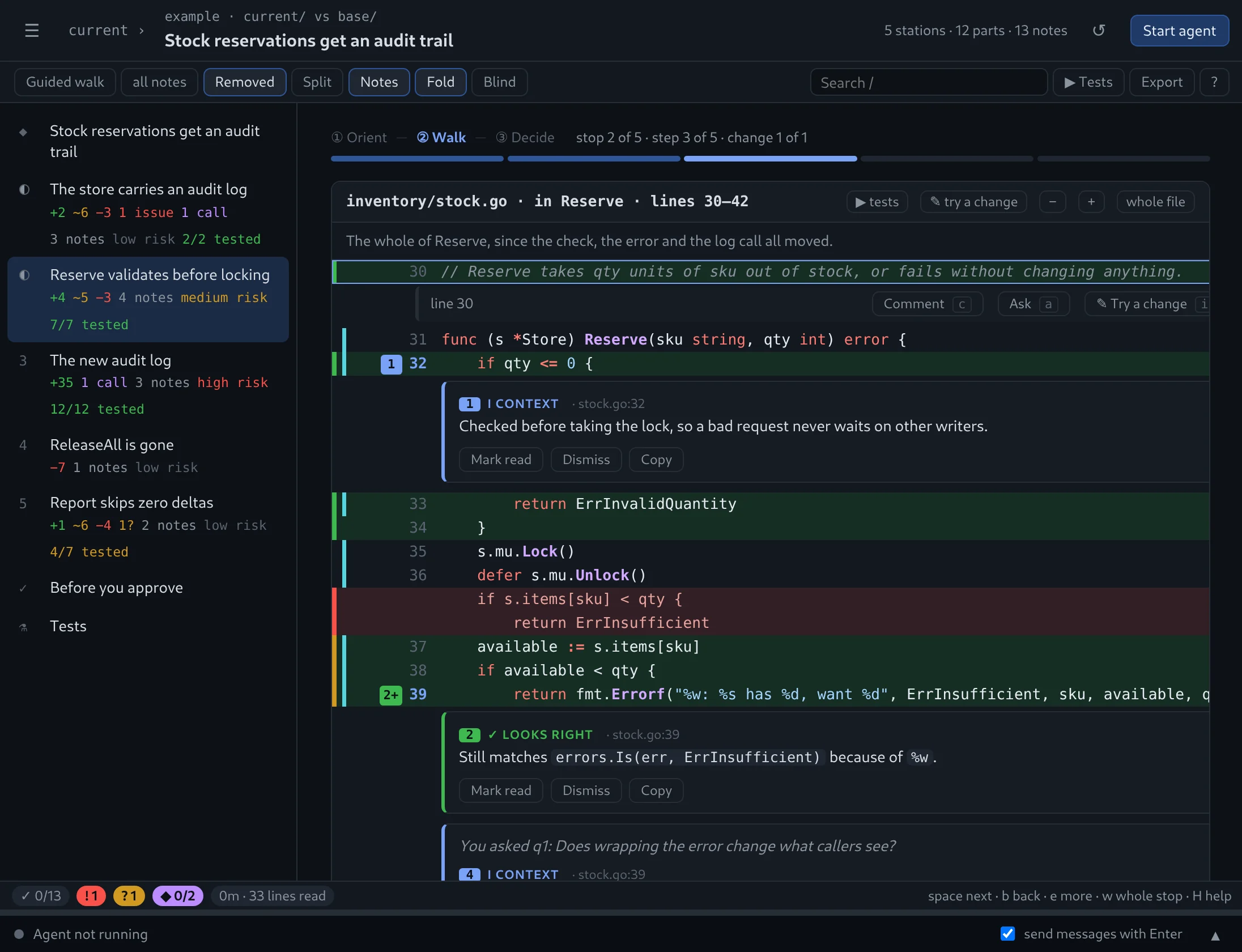
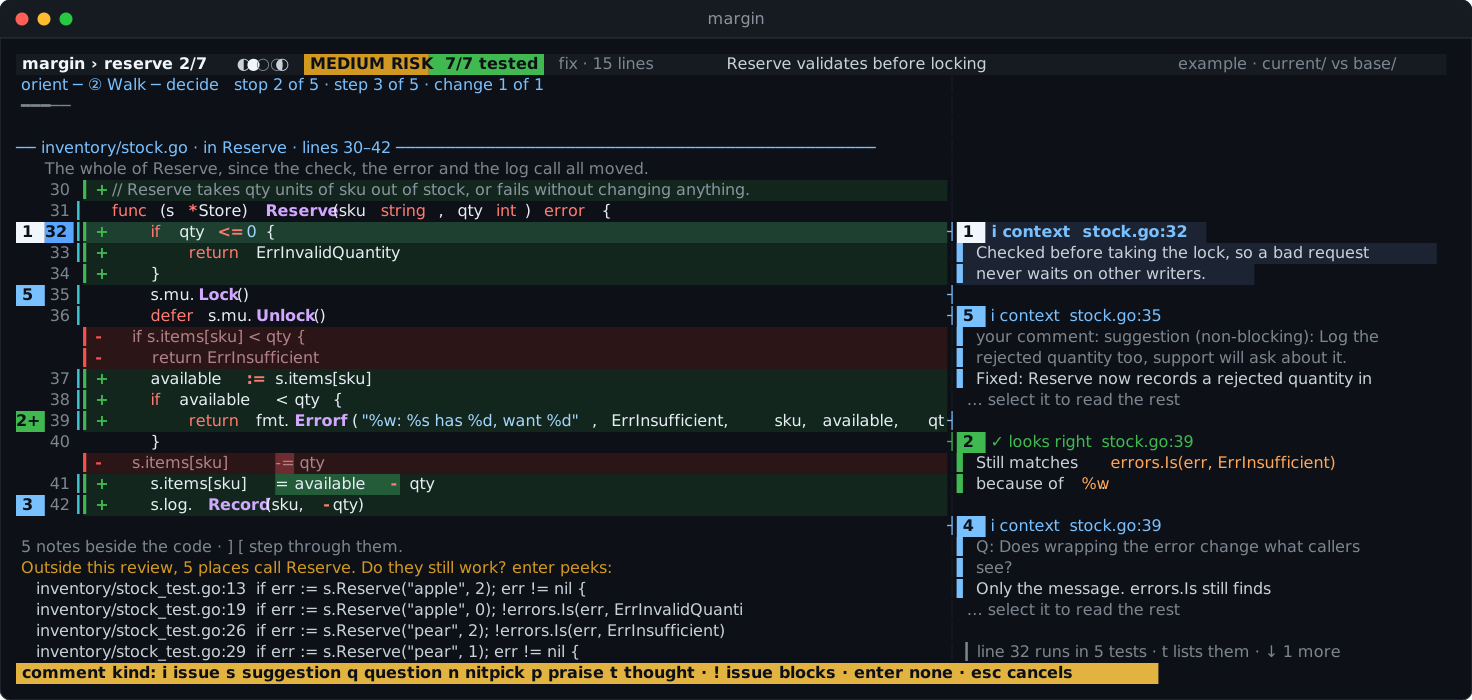
② WALK stop 2/3 · Reserve validates before locking MEDIUM RISK 2 tests step 1/1 · inventory/stock.go
why now: the method that calls the log, on the store from stop 1 · check: is a quantity of zero or less refused before the lock is taken?
space next · b back · c comment · a ask · t tests · H helpread 41 lines · 6 min
works withClaude CodeCodexGemini CLIOpenCodetmuxgwGitHub PRsGo · Python · anything git
Yes, another one

We know. Yet another code review tool.

There are plenty of places to look at a diff. margin is the one that makes sure you actually read it, and can tell you when you are done. Here is what people say before they try it.

GitHub already has code review.it has a comment box.

A pull request page lists files alphabetically and lets you approve without opening half of them. margin plans the route, and exports the review to GitHub when you are done.

My agent can just review it for me.and here it does — in the margin.

The agent writes a note beside every change and answers on the line. You make the call. It never approves anything, and blind mode lets you read first.

I'll just read the diff.for the first 400 lines, maybe.

margin cuts the change into a few stops, keeps the import churn for the end, counts what you read and tells you when it is time for a break.

The tests pass. Ship it.do they test this line?

Per-line coverage shows what no test runs. Then break the line yourself, in place, with vim keys, and watch which tests notice.

Another AI thing touching my code.read-only. honestly.

margin runs nothing from the repository and changes nothing, unless you try a change yourself. That one is put back the moment its tests end.

I live in the terminal. / I don't.both. same review.

margin-tui runs beside your agent in tmux; margin-gui is a desktop window with the agent inside. Start in one, finish in the other.

A pull request page“Review this” to an agentmargin
A reading order, with reasonsalphabeticalif you askstops, risky first
A note beside every changenoneone long replyon the line
Ask about a line, get the answer therecomment, then waita new chata, answer in place
Which tests run this linenonoin the gutter
Break a line, see if a test noticesnonoi, edit, :w
Knows what you have not readviewed checkboxesnothe recap lists it
You make the callyesit doesyes, with a recommendation
Before you push, offlinenoyesany branch, commit or worktree
The problem

A diff tells you what changed.
Not why, not where to start, not when you are done.

Changes arrive faster than ever, many of them written by agents. Skimming a wall of red and green is how bugs get approved. margin turns the wall into a route.

git diff

  • Alphabetical filesYou read in the order the filesystem chose, not the order the code needs.
  • Silent linesNothing says why a line is there, or whether a test ever runs it.
  • Context switchingA question means a new tab, a grep, a chat window, and losing your place.
  • "LGTM, I think"No idea what you skipped, so the approval is a guess.

margin

  • A route, with reasonsRelated files grouped into a few stops, in dependency order, each saying why it comes where it does.
  • A note on every changeWhy it is there and whether it looks right, beside the line. Untested lines marked in the gutter.
  • Ask on the linePress a. The answer lands as a note right where you asked.
  • A verdict you can defendThe recap recommends approve or request changes, and lists exactly what is still open.
How it works

Three phases. Four keys.

space go on · b go back · c comment · a ask. Everything else can wait behind H.

①Orient

One screen, one question.

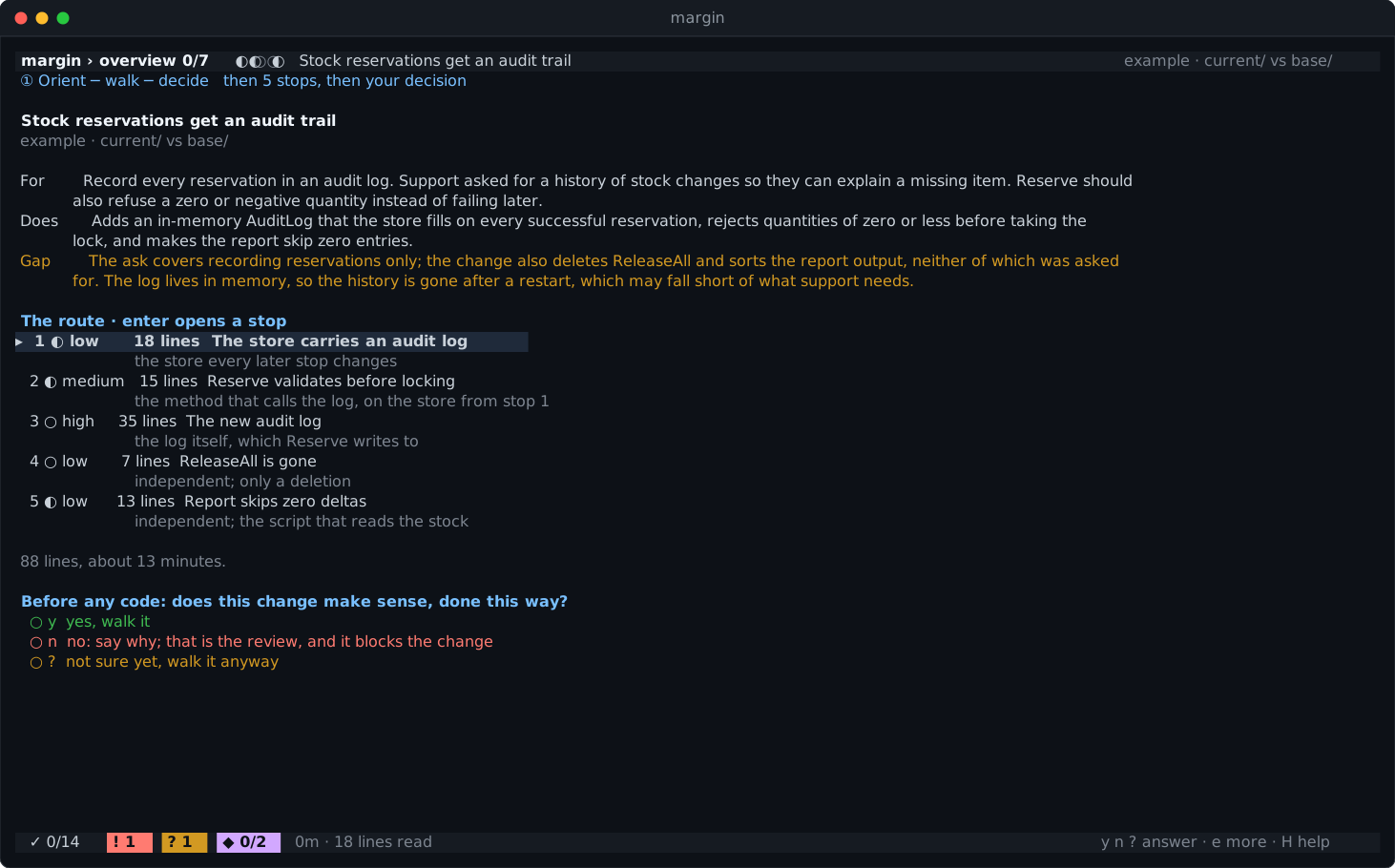
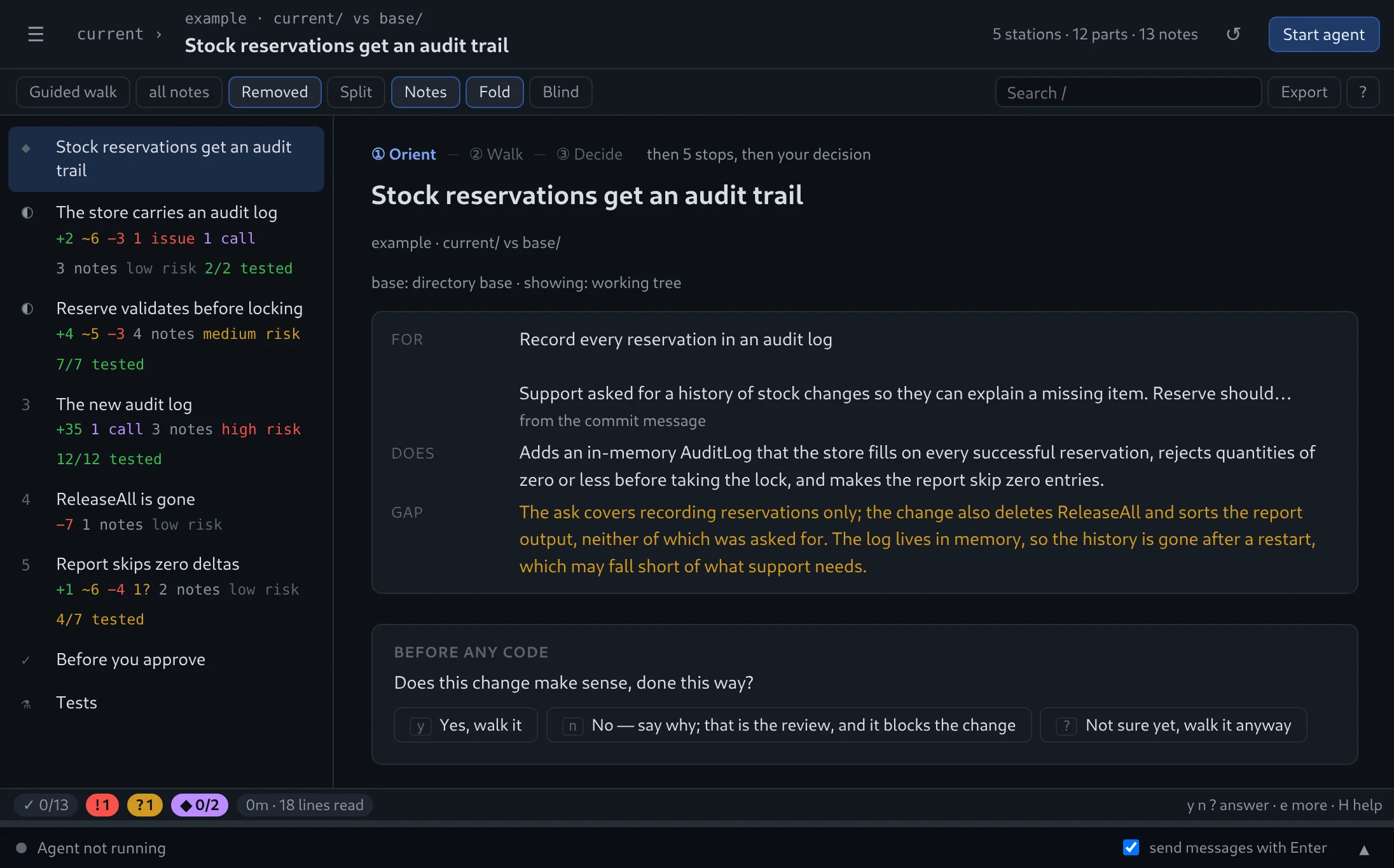
What the change is for, what it actually does, and the gap between the two. Then the route. Then, before a single line of code: does this make sense, done this way?

y walk it? not sure yetn say why, skip to decide
margin-tuimargin-gui
②Walk

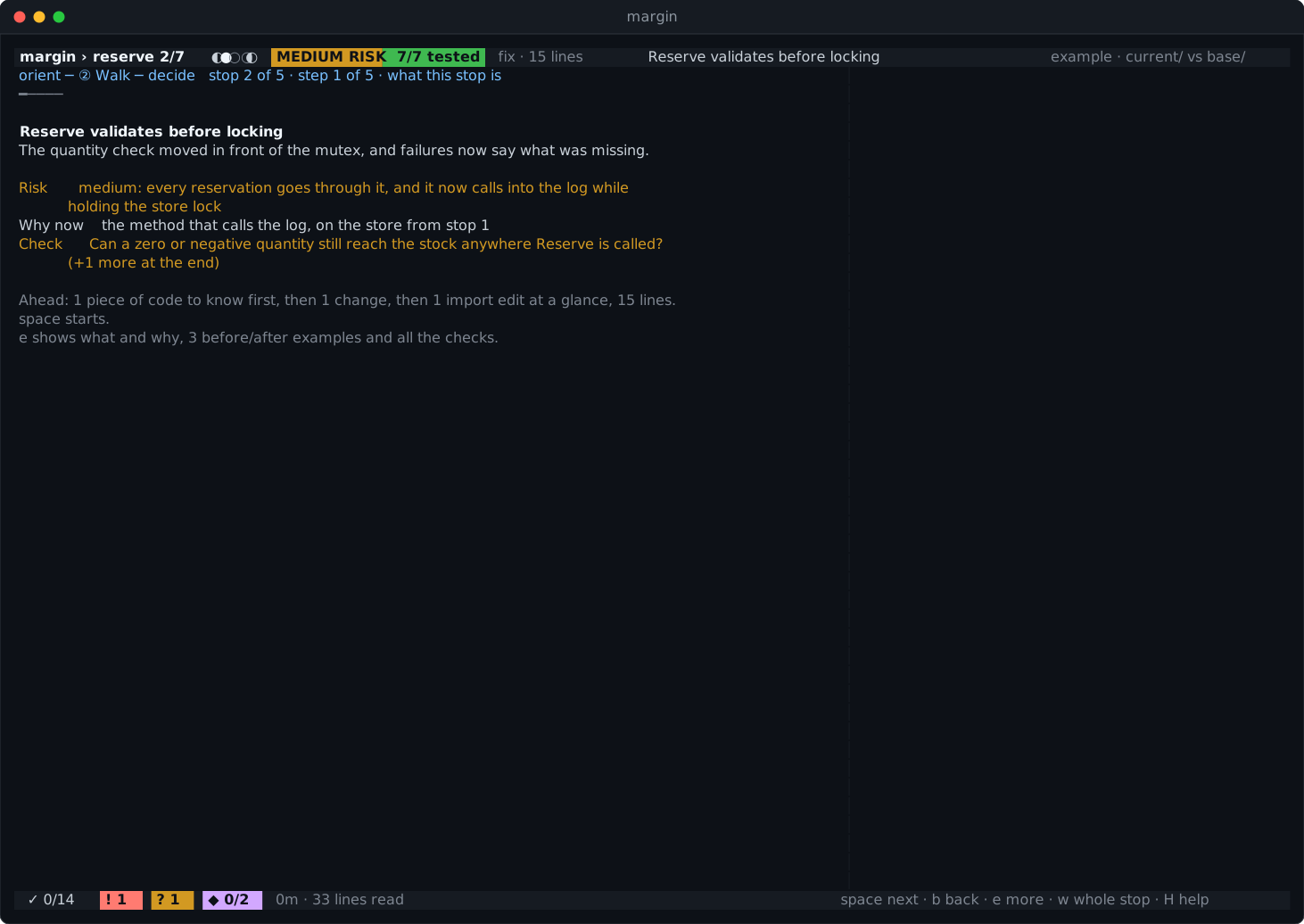
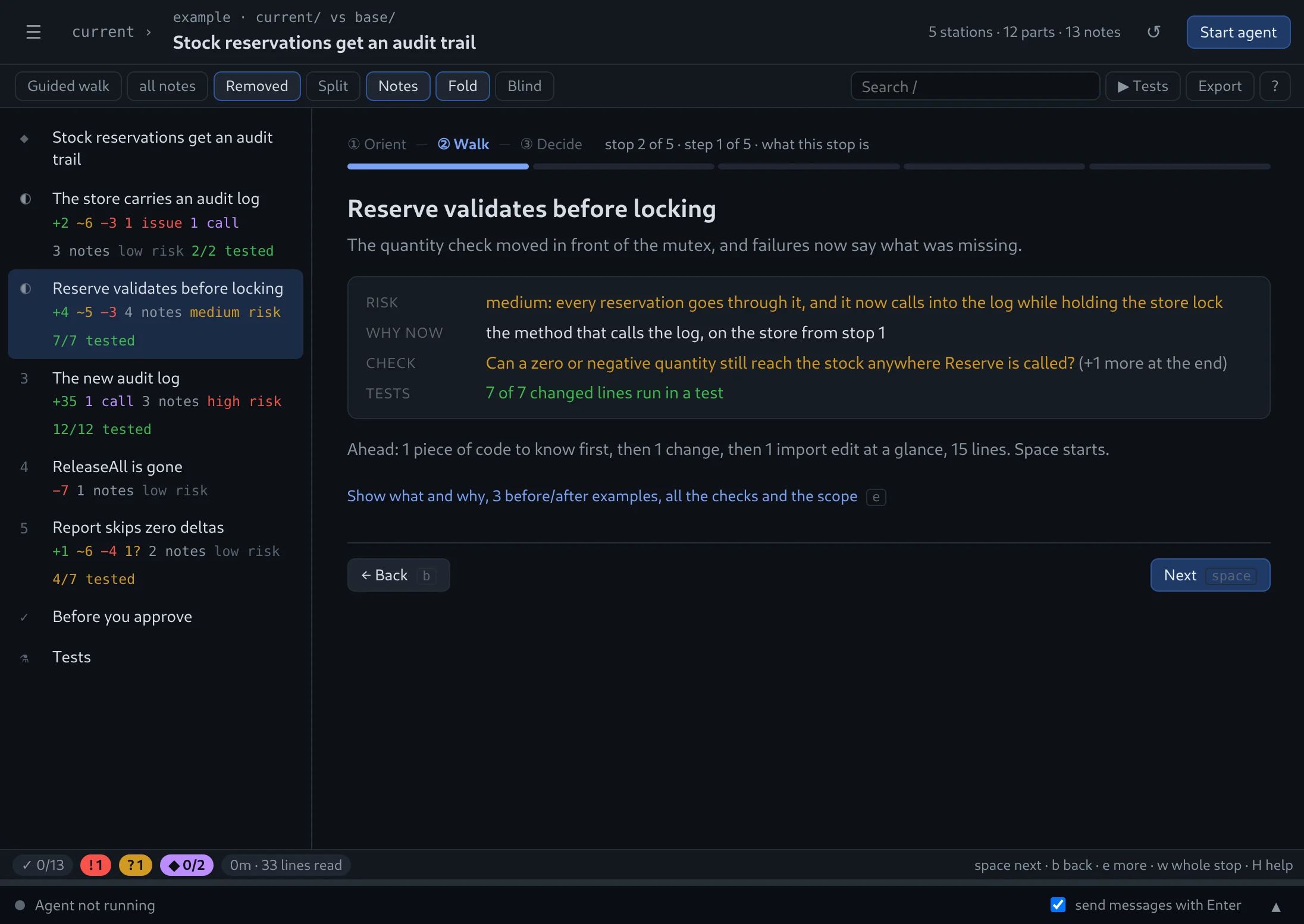
Every stop opens with a card.

What it is, how risky, why it comes now, and the one thing to check. You know what you are looking for before you look.

margin-tuimargin-gui
②Walk

One change per step.

A whole reading unit, with the agent's notes numbered beside their lines and a question to answer before space. Import churn is batched at the end so it never interrupts.

margin-tuimargin-gui
②Walk

Settle it where it belongs.

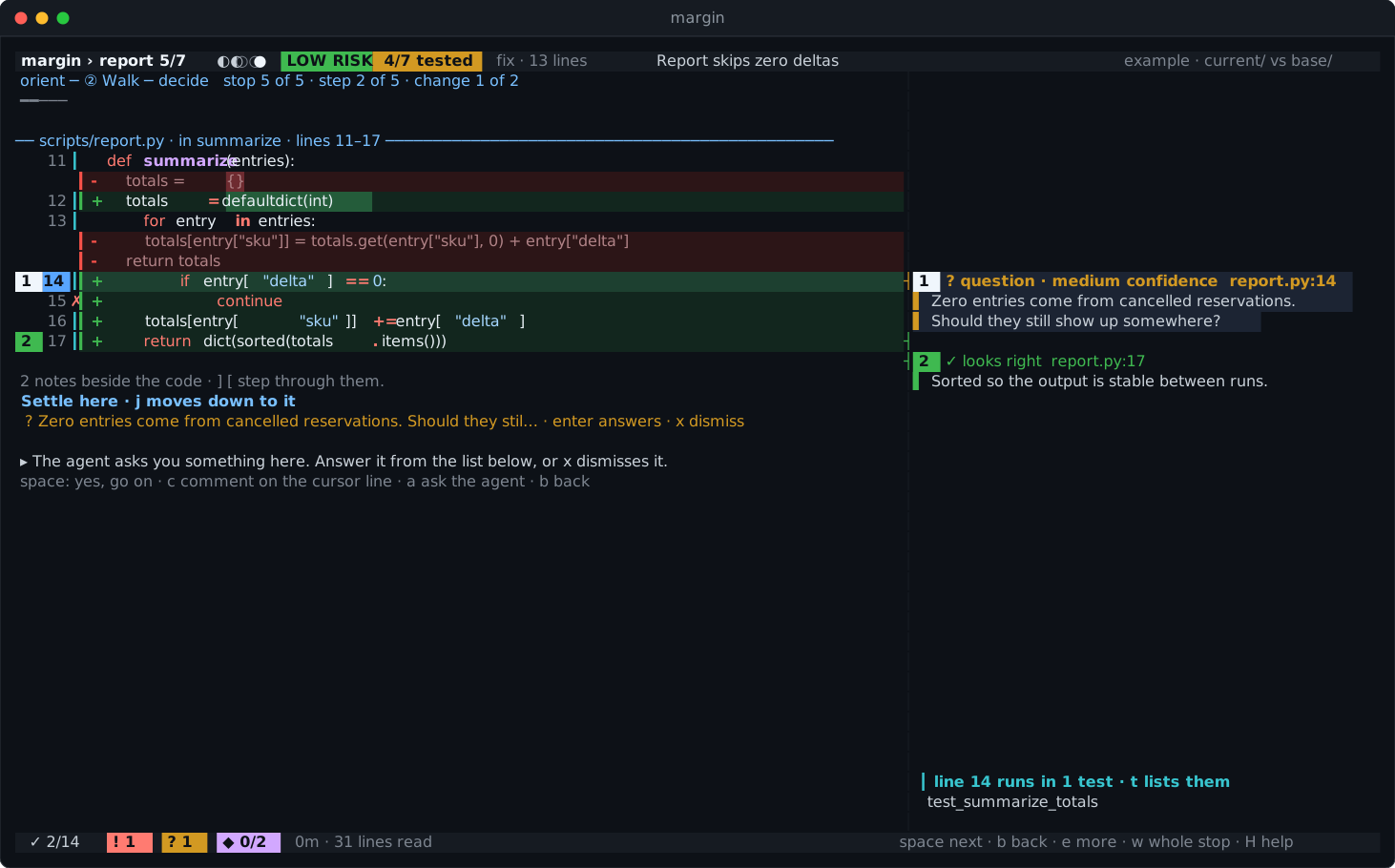
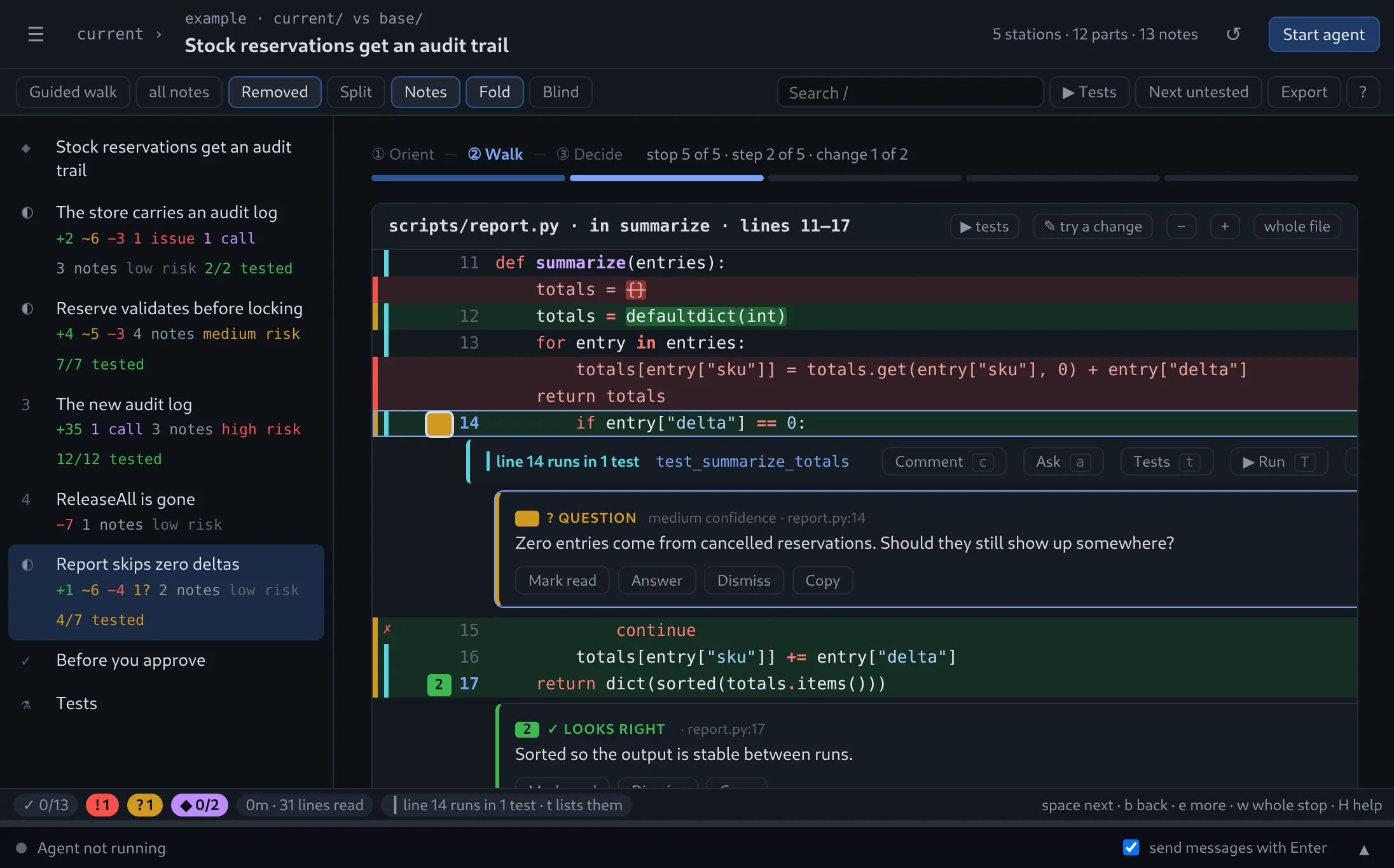
Problems to agree with, calls to make, questions only the author can answer — listed right under the code they are about. Nothing piles up for the end.

margin-tuimargin-gui
②Walk

Comments the author can act on.

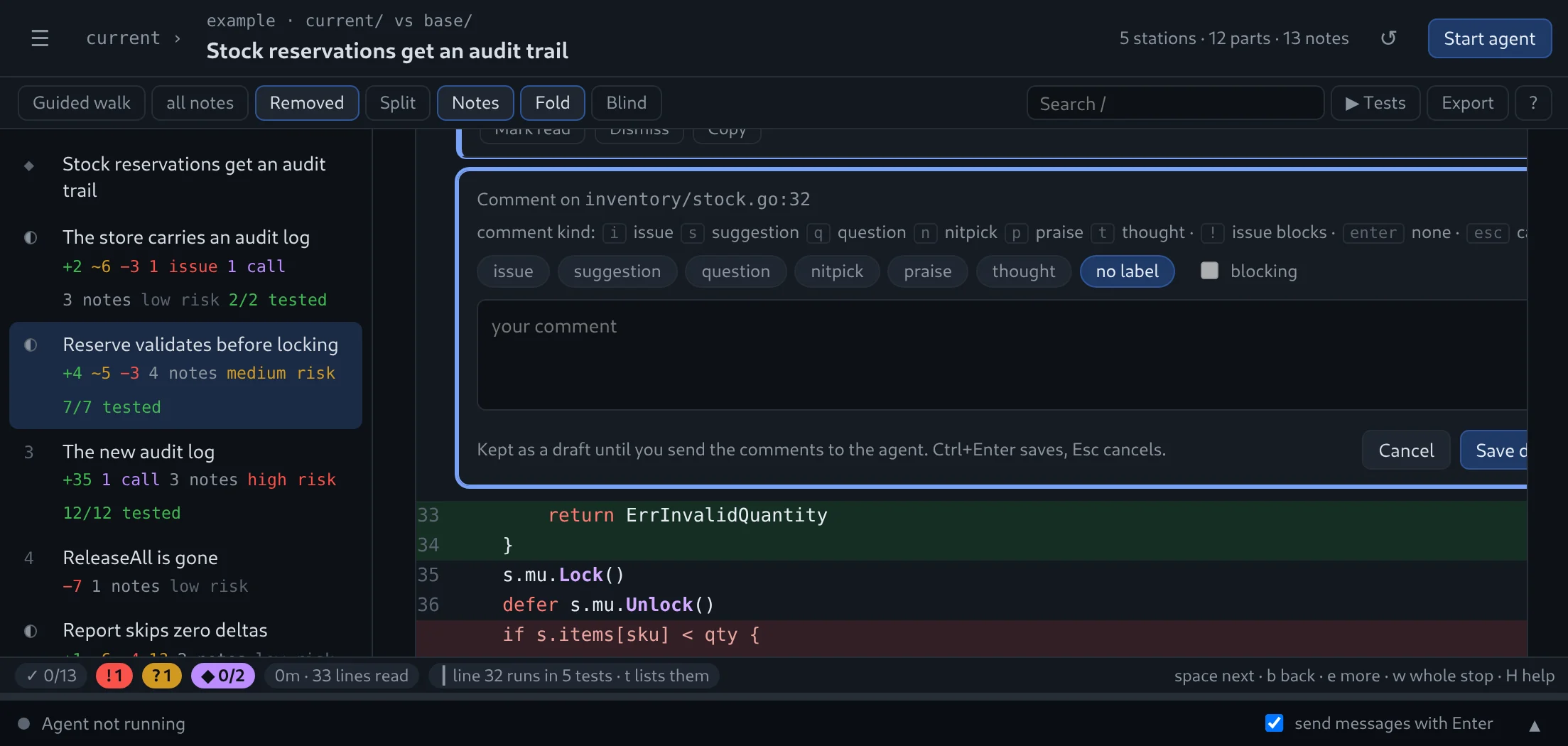
c asks the kind first — issue, suggestion, question, nitpick, praise, thought — and coaches you while you type. S sends them; the agent fixes the code or explains why not.

margin-tuimargin-gui
③Decide

The recap tells you what to do.

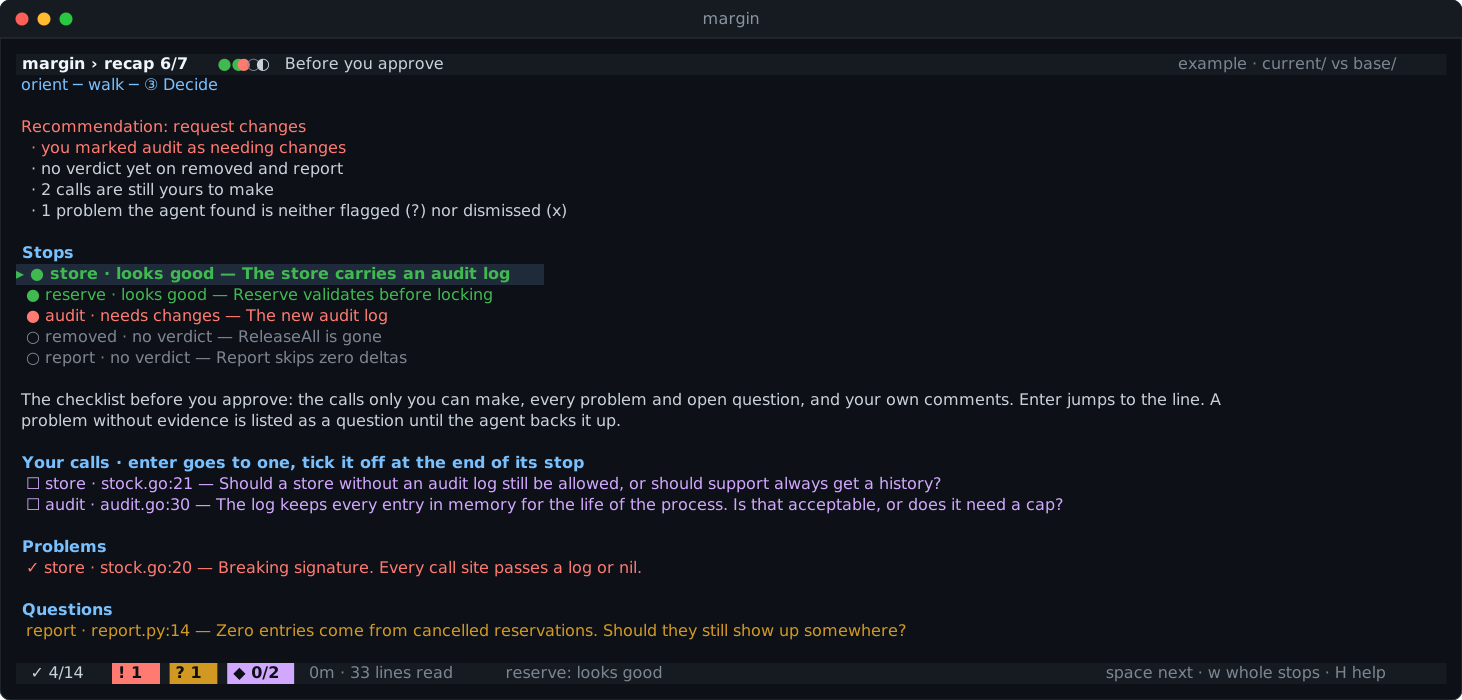
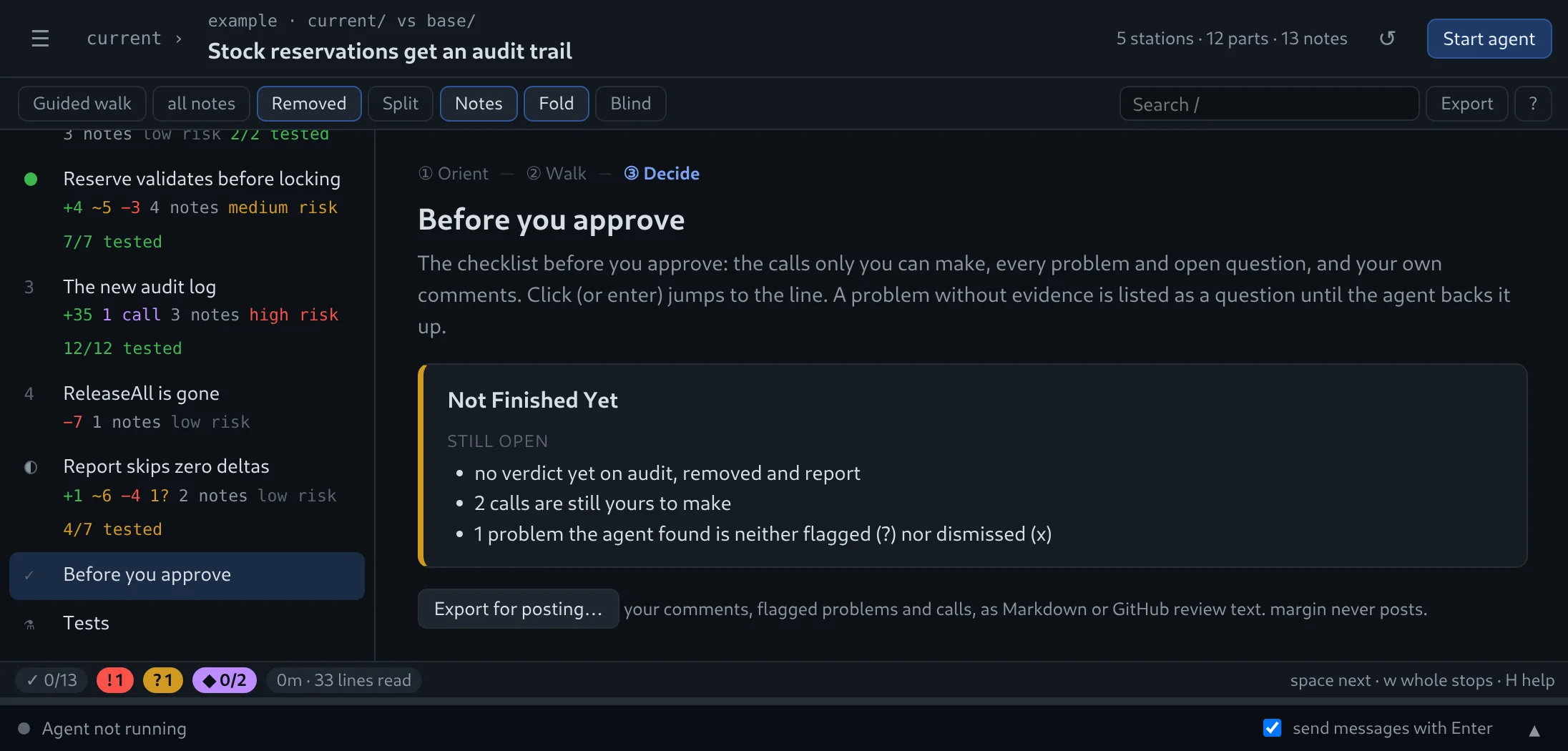
Approve, request changes, or not finished — with the reasons and every open item one enter away. margin-tui export makes it a PR review you post yourself.

margin-tuimargin-gui
The part people love

Don't trust the tests. Break the code.

A note says a check matters. Does any test agree? Change the line and find out, without leaving the review or touching your branch.

  1. Press i on the line.Or V a whole block first. It turns into an editor right where it stands, colours and line numbers included.
  2. Edit it like vim.cw, dd, ciw, x, ., u, visual mode. Delete the whole check if you like.
  3. :wThe tests that run those lines go once as the code is, once with your edit. Then margin puts every line back.

✓→✗ means a test caught it.
✓→✓ means nobody would have noticed.

margin — inventory/stock.go
Everything around the change

The context you would have gone looking for.

Already on screen, one key away, without leaving the review.

Test coverage

See which changed lines no test runs.

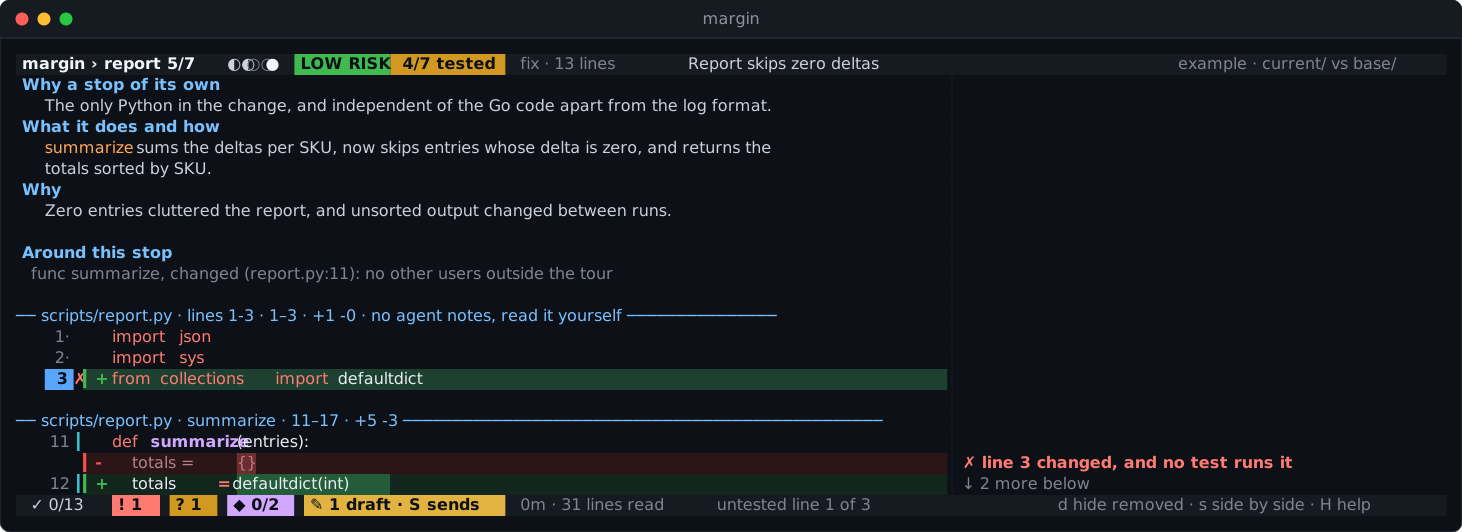
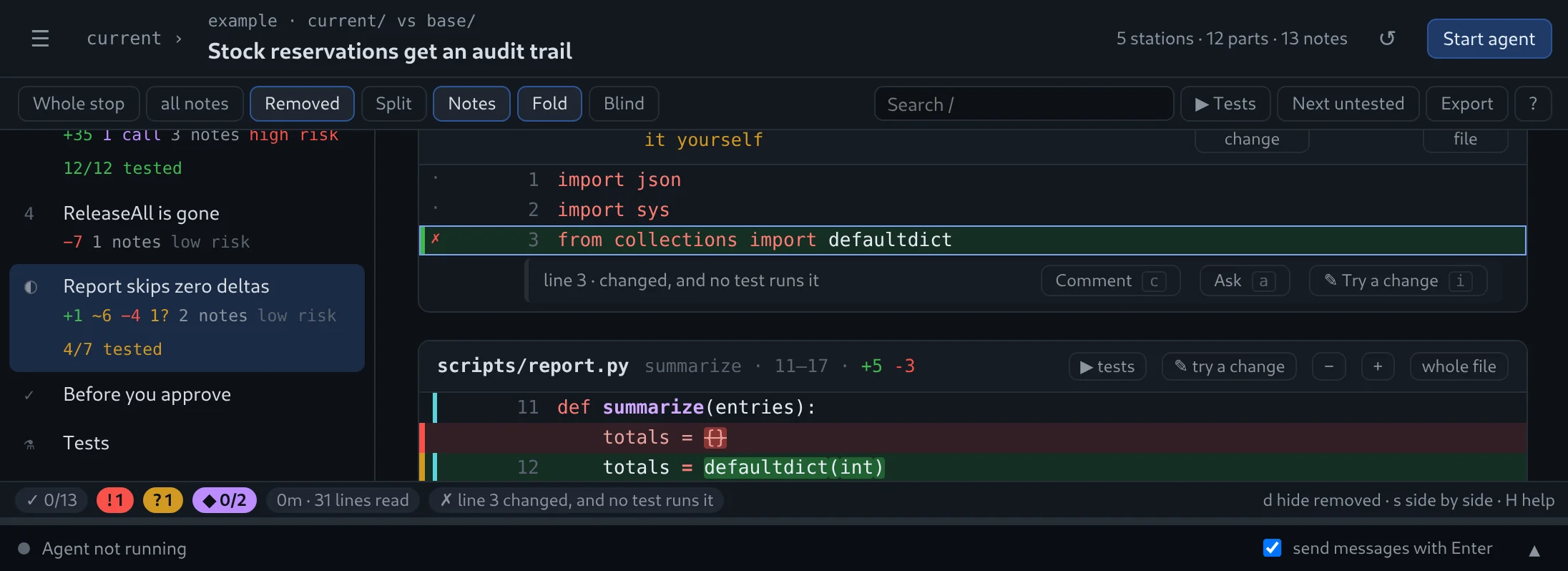
The agent measures coverage per test. Untested lines glow in the gutter, u jumps between them, t lists the tests that run a line, spotlights one or runs them.

Changed lines that no test runs, marked in the guttermargin-tuimargin-gui
Start anywhere

One command.

margin-tui            # uncommitted
margin-tui --staged   # the index
margin-tui feature-x  # a branch
margin-tui a1b2c3d    # a commit
margin-tui --pr 123   # a pull request
margin-tui pick       # from a list

Or pick any of them in margin-gui's sidebar, or ctrlk.

Around this stop

Callers, examples and history.

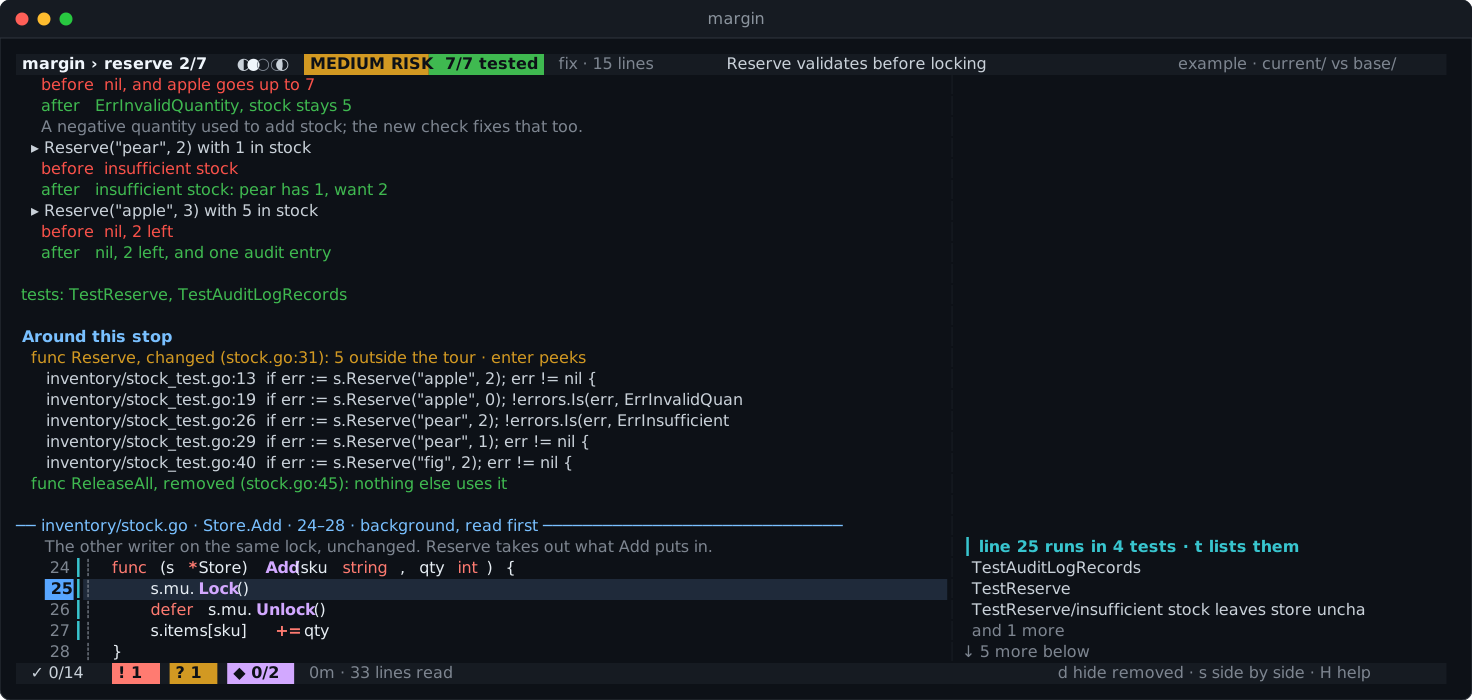
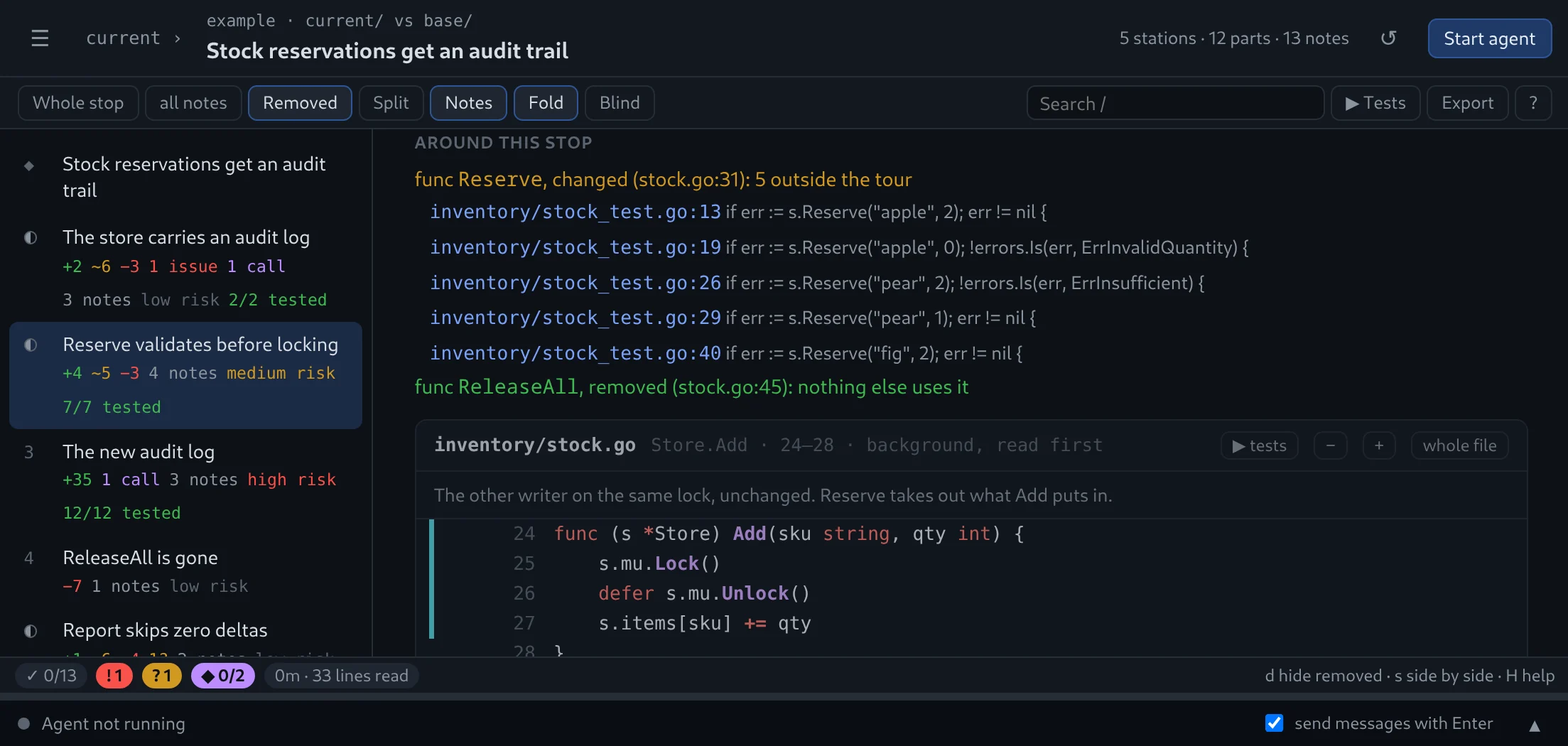
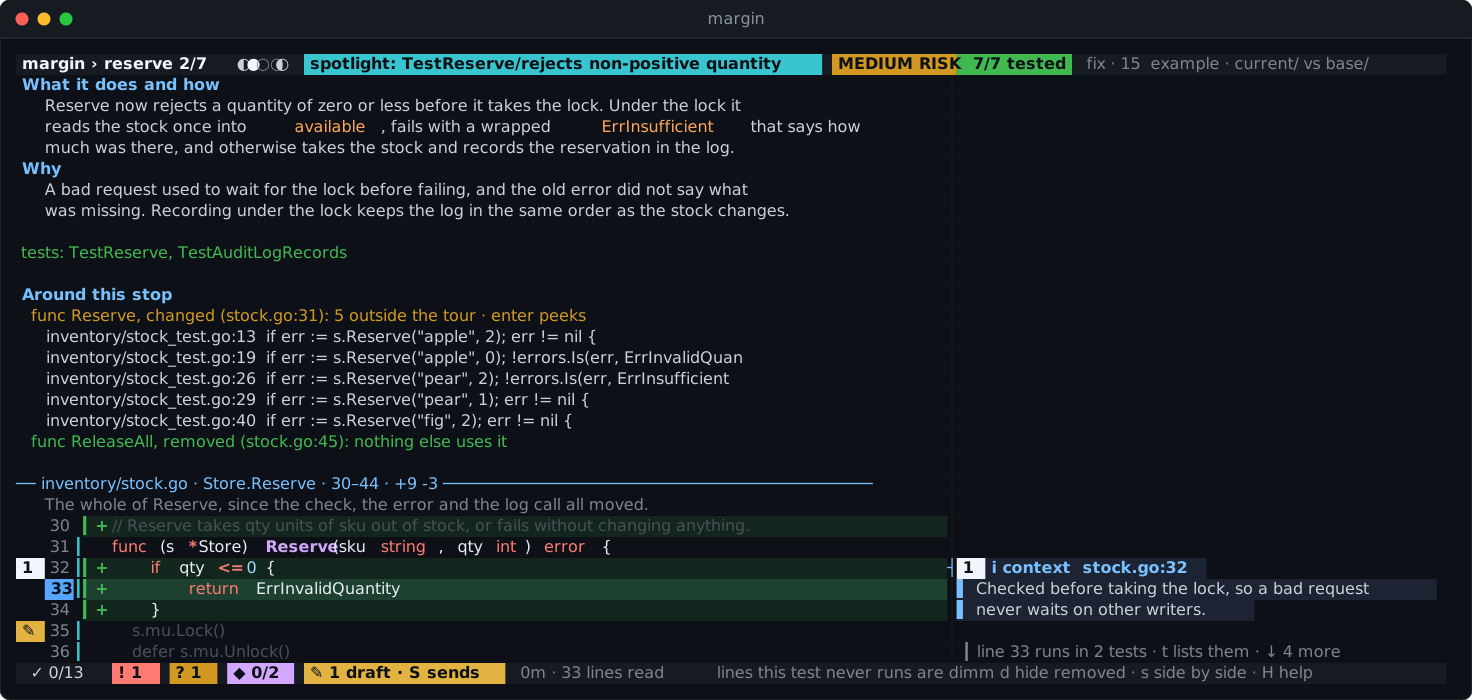
Who calls the function you are reading, what it did before and does now, and the commits that shaped it. enter peeks.

Callers, before and after examples, and blame history around a stopmargin-tuimargin-gui
Spotlight

Follow one test through the change.

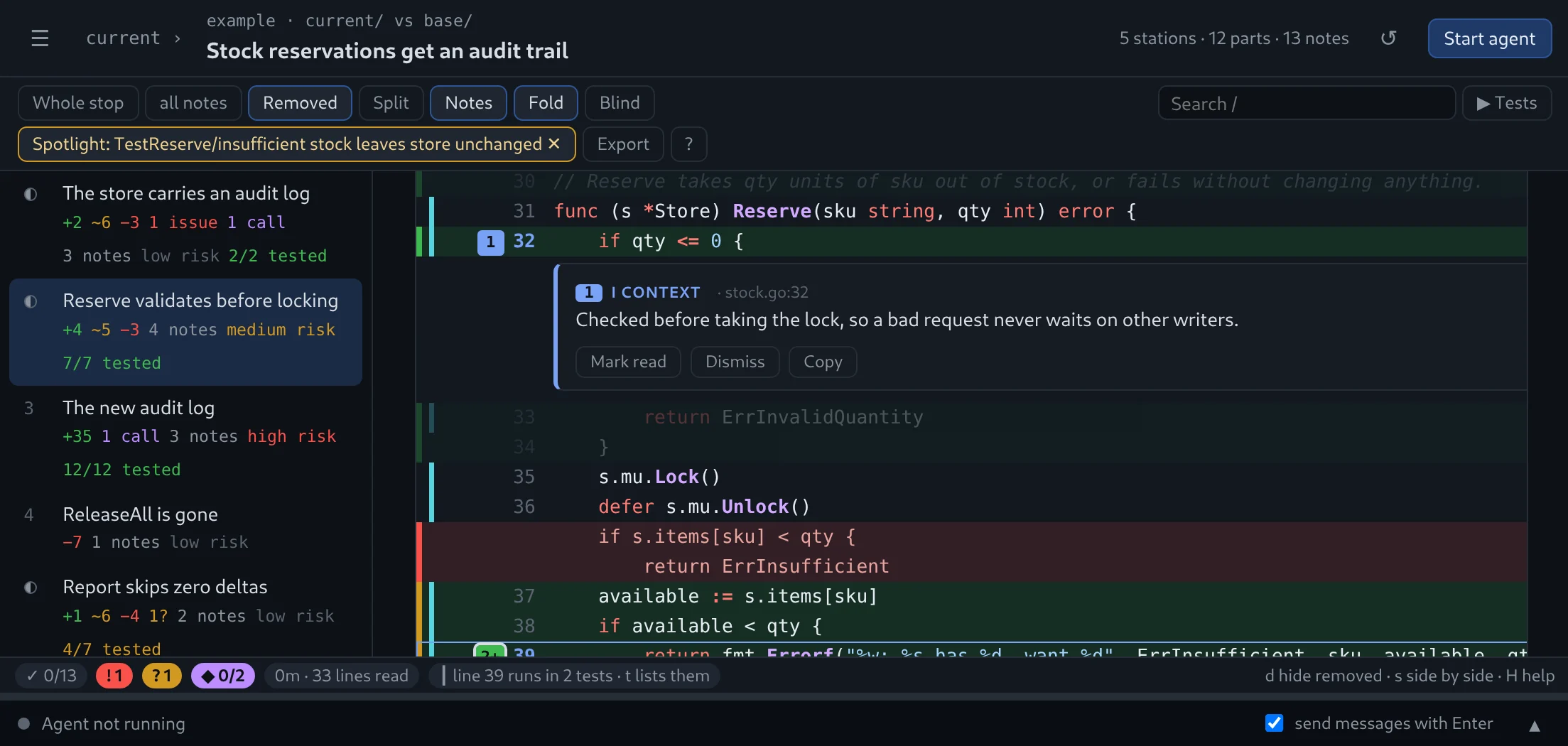
Pick a test and every line it does not run dims. See exactly which path it takes.

One test spotlighted, every line it does not run dimmedmargin-tuimargin-gui
Run the tests

Run what runs this line.

T runs exactly the tests that run the selected line, with the command you set up once for the repository: go test, docker compose run, pytest. Each test gets its ✓ or ✗; the command lives in your settings, never in the repository.

Try a change

Would a test notice if this line were wrong?

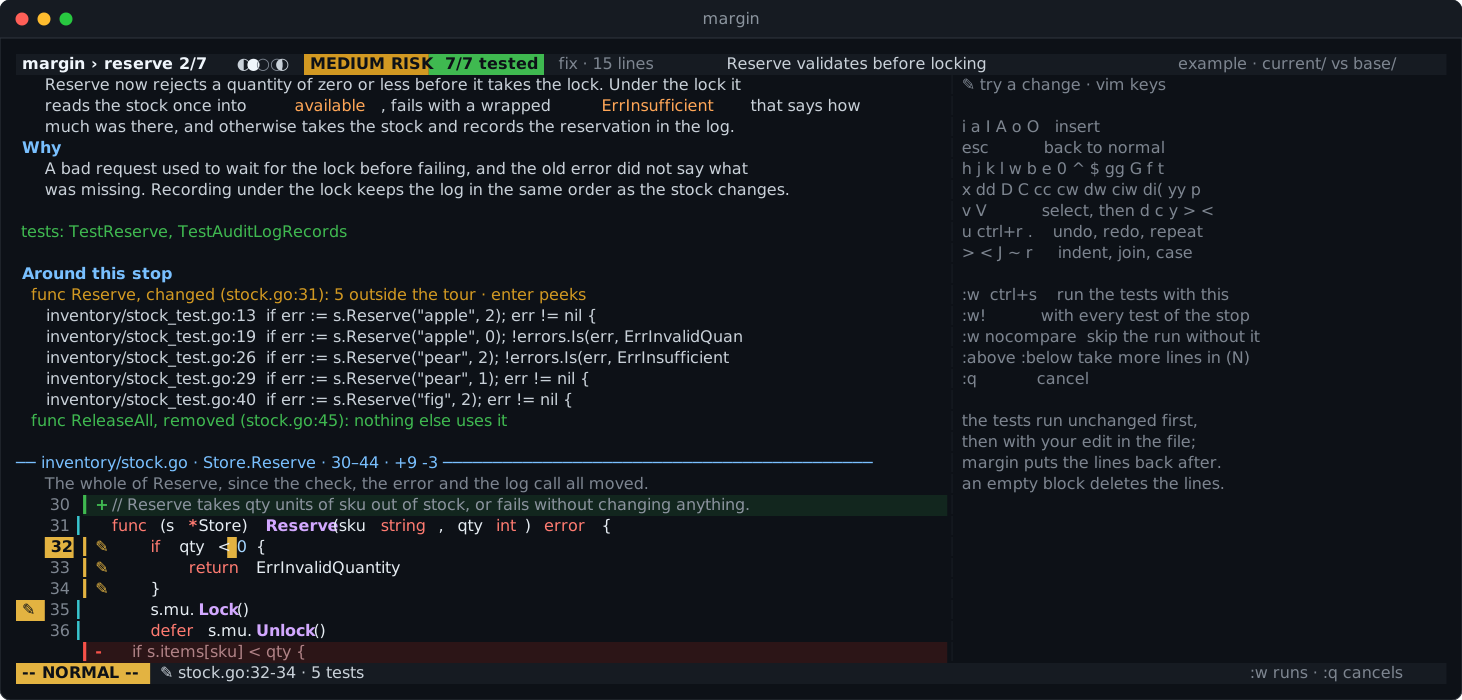
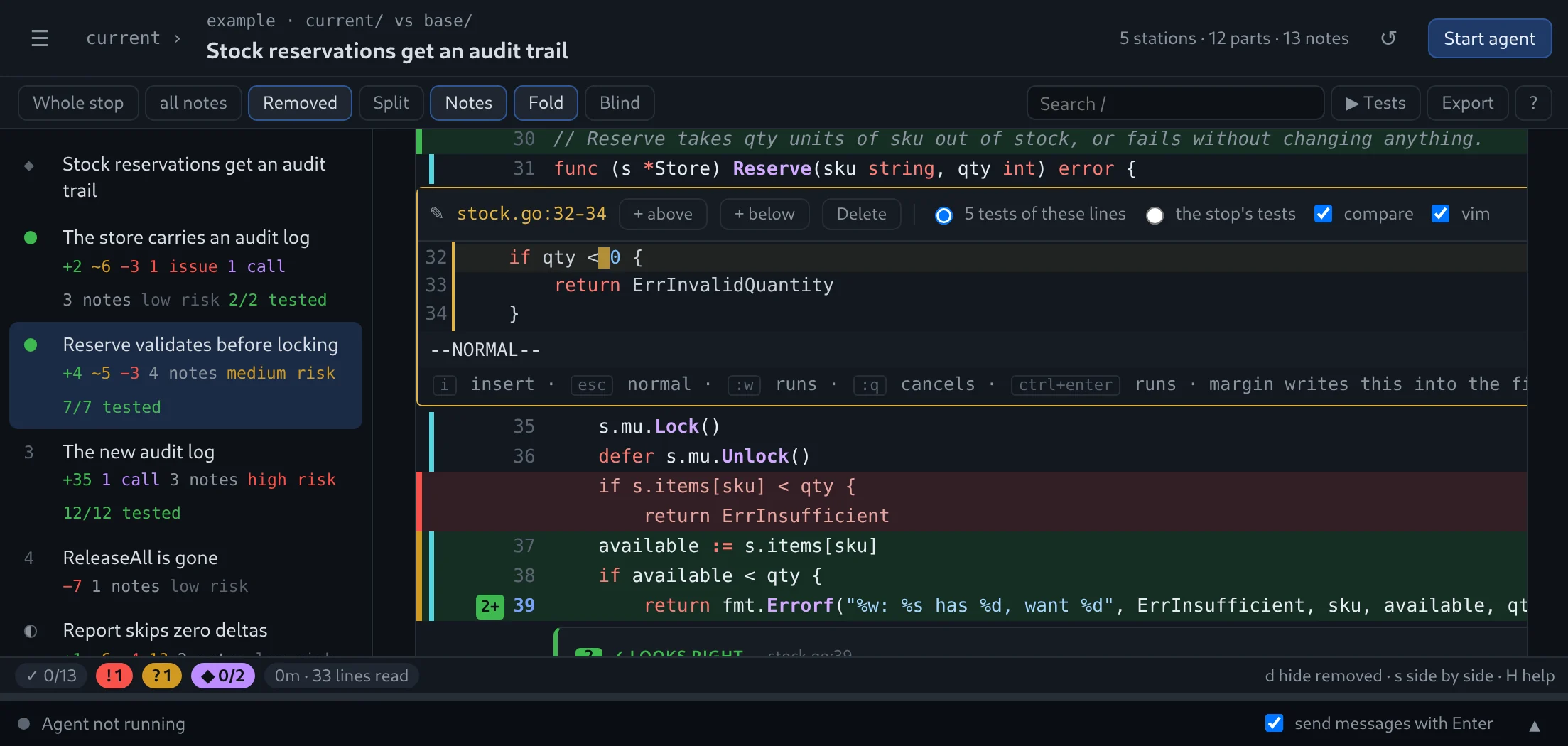
i turns a line, or a V block, into a vim right where it stands, in both apps. See it run ↑ — or keep your own: E opens $EDITOR.

Lines 32 to 34 of stock.go open in place in a vim editor, the check changed to qty < 0margin-tuimargin-gui
Moved code

Moved, not rewritten.

Code that only moved is shown as moved — not as a deletion and an addition you compare by eye.

Blind mode

Read first, then see the notes.

v hides the agent's notes on high-risk stops, so you form your own view before you see theirs.

Resume

Stop any time.

Come back tomorrow, in either app. Verdicts, marks, comments and notes are exactly where you left them.

Nothing left out

Every change has a place.

Changes no stop shows get a stop of their own, and ignored or binary files are listed, so the route never hides part of the diff.

Side by side

Old left, new right.

s splits any stop, d hides removed lines, f shows the whole file and + more around the change.

Search

Find it in every stop.

/ searches the code of the whole review, n and N jump between the matches.

Export

A review ready to post.

Markdown to paste, or --format github for gh api with the right event. margin never posts for you.
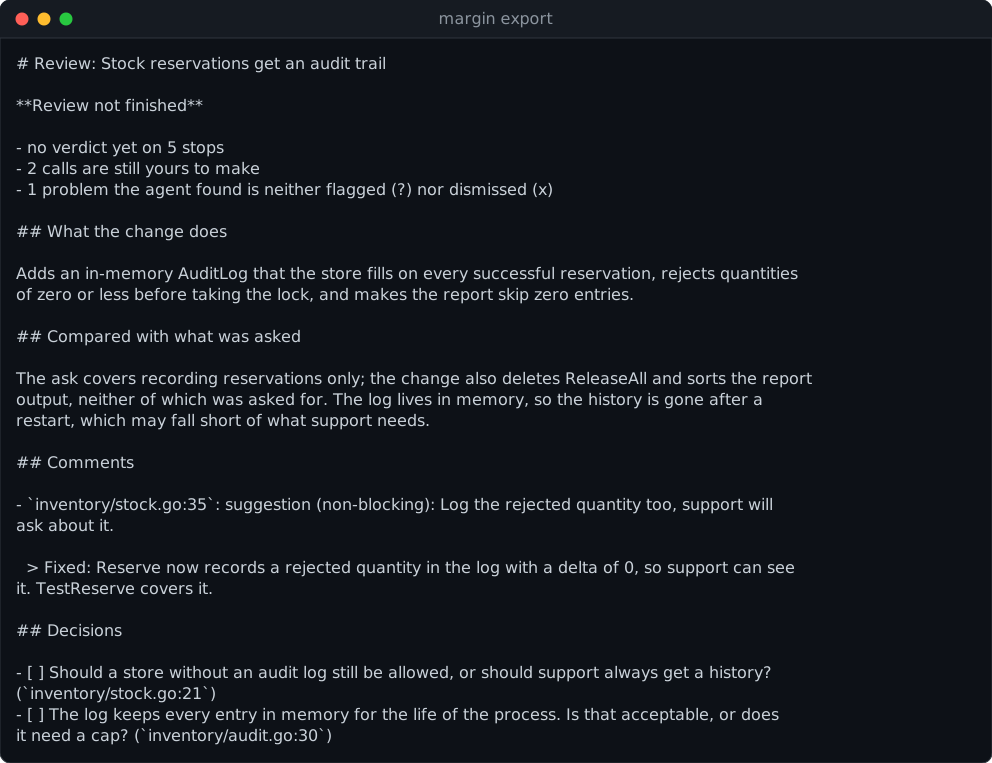
margin export output
Per repository

Teach it your codebase.

.margin/ignore skips generated files. .margin/instructions tells every review what deserves care — read from the base commit, so a change cannot rewrite its own rules.

# .margin/instructions
Migrations must be reversible.
Every handler checks the tenant.
# .margin/ignore
*.pb.go
dist/
4keys to learn: space, b, c, a
3phases, always in the same order
0changes to your code you did not try yourself
400lineswhere the footer suggests a break, before quality drops
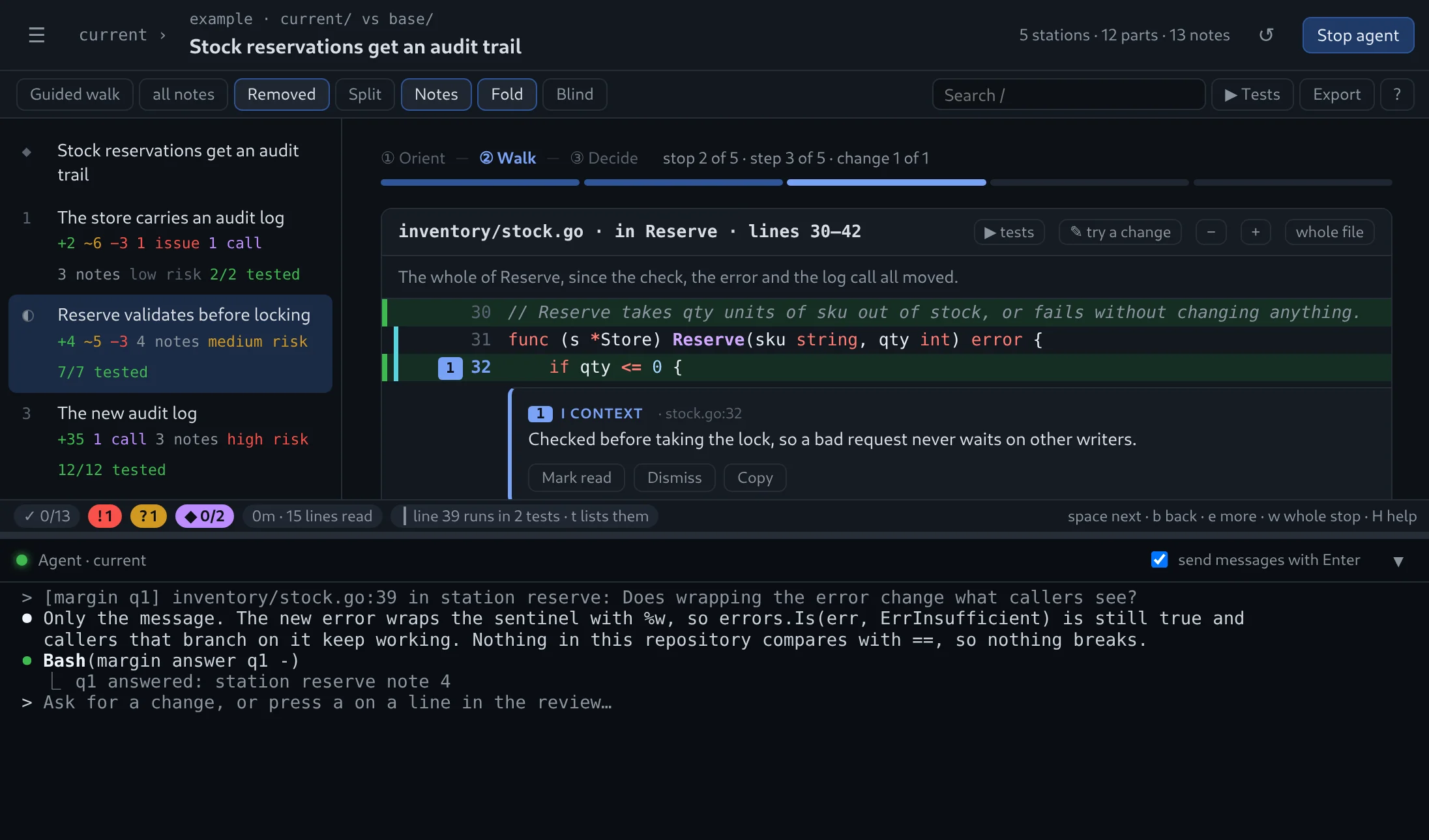
Two front ends, one review

In the terminal, or in a window.

Both read and write the same review files. Start in one, go on in the other.

margin-tui

The terminal viewer.

The review in your terminal, the agent in a tmux pane beside it. Everything is a key; the mouse picks lines, blocks and stops.

go install github.com/redrick/margin/cmd/margin-tui@latest
margin-tui pick

Read the manual →

margin-gui

The desktop app.

Your repositories, worktrees, branches and pull requests in a sidebar, the agent in a terminal inside the window. No tmux.

go install github.com/redrick/margin/cmd/margin-gui@latest
margin-gui --install   # into your launcher

Read the manual →

Any agent

Bring your own.

Claude Code by default; Codex, Gemini CLI, OpenCode or any agent CLI that takes a prompt and runs shell commands. margin-tui config set agent codex.

Your files

Reviews where you want them.

In .margin/reviews/ of the repository, ignored by git, by default. Or a private folder, or your notes vault: ~/notes/{project}/topics/{topic}.

Answers

Talk back.

The agent answers each comment in a markdown note. margin-gui shows it with A; reply under an answer or edit the note in place.

The skill

Ask your agent for a margin review.

margin-tui skill install claude (or codex) teaches an agent you started yourself how margin works, so it can prepare a review for you to open. Claude Code can also add it as a plugin: /plugin marketplace add redrick/margin.

Not a hunch

Built on what code review research found.

Every part of the walk follows a published result about how people actually review code.

Ask "does this make sense?" before any detail.

Design comments come first; the details may not survive them.

Google, navigating a CL →
Few, coarse steps — not a checklist.

Strict step-by-step guidance helped on small changes but got in the way on large ones.

Gonçalves et al., 2022 →
Show the order, and explain it.

Reviewers prefer reading what is used before what uses it, and get lost in orders they cannot follow.

Baum et al., 2017 →
Related changes together.

More defects are found when the order follows the code's relations rather than file names.

Baum et al., 2019 →
Risky parts early.

Whatever a reviewer reads last gets fewer comments.

Fregnan et al., 2022 →
Comments with a kind.

Labelling each comment tells the author what is a request and what is a thought.

Conventional Comments →
Safe by design

Made for code you did not write.

margin treats the repository under review as untrusted. You can point it at a stranger's pull request.

  • Runs only what you set upOn its own, margin runs nothing from the repository and changes neither its code nor its history. Tests run only with the command in your own settings, when you ask; a tried change is one line, put back when its tests end. git only through read-only plumbing, refs after --end-of-options. The one fetch is a pull request you click Fetch and review on in margin-gui.
  • Rules from the base.margin/ settings come from the commit compared against, so a change cannot loosen its own review.
  • Clean terminalEscape sequences and bidi controls are stripped before rendering. Questions never go to a plain shell.
  • Untrusted text, labelledCommit messages, PR descriptions and repo instructions reach the agent marked as written by someone else.
Yet another tool? Fine. Make it the one you open first.

Stop skimming.
Start reading.

Install one, run margin-tui in a repository with uncommitted changes or open it in margin-gui, and press space.

terminalgo install github.com/redrick/margin/cmd/margin-tui@latest
desktopgo install github.com/redrick/margin/cmd/margin-gui@latest && margin-gui --install